Browse the guide
THE VIRTUAL COO
Meet COOPER.
A clearer view of your company.
A little less chasing things down.
COOPER helps business owners find answers across their connected tools and company knowledge. Ask a question in the web app or Telegram; it works out what you need, reads the sources it can access, and brings the answer back with supporting references.
“Anything pending for me?”With an email conversation in context, COOPER can interpret this as a request to review what needs your attention.
How it works
Three parts work together: connected sources, a reasoning loop, and workspace context. The learning loop helps COOPER interpret future requests after a resolution has been checked and approved.
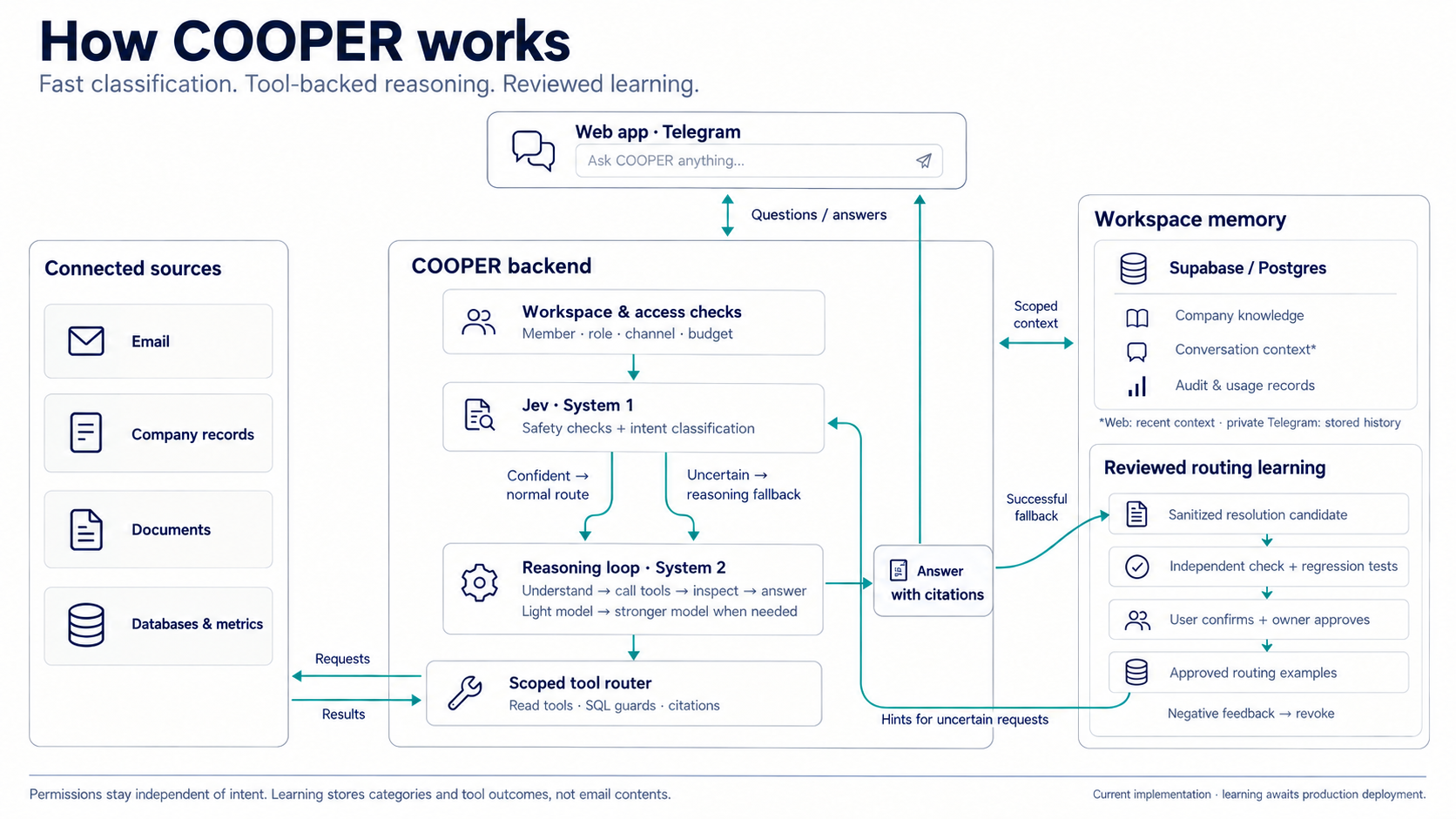
This guide includes the routing-learning implementation, which is awaiting production deployment. Available connections and features depend on your workspace.
From question to answer
Establish the context
COOPER checks your workspace, membership, role, channel and available capabilities. Recent conversation helps it understand follow-up questions.
Classify quickly with Jev
The fast “System 1” layer checks safety and intent. A confident classification takes the normal route. An uncertain intent continues into reasoning.
Reason and use tools
The “System 2” loop interprets the request, calls permitted read tools and inspects their results. It can use a stronger model when needed, or ask a useful clarification when context is missing.
Return an answer you can inspect
COOPER brings back the answer with source references where available. Access restrictions still apply throughout the tool loop.
Connected sources
COOPER uses the capabilities available in your workspace. Connecting a source gives it a way to retrieve information within that connection’s access rules.
Find messages, read threads and review what needs attention through permitted mailbox tools.
Company records
Look up the company information your workspace has made available.
Documents
Search available document content and retrieve extracted facts with references.
Databases & metrics
Inspect connected schemas, query through read-only SQL guards and retrieve verified metrics.
Workspace memory
COOPER combines a current company brief, private conversation context and notes you explicitly save. Owners control the rollout in Settings → Memory. These features can be disabled independently.
Current company brief
A compact brief is rendered from confirmed company records on every request. It respects workspace membership and audience. Group Telegram gets the member-visible brief; private notes never enter group chat.
Private conversation context
When enabled, the web app and private Telegram retain encrypted user messages for 30 days. Recent messages stay available directly, while a background pipeline assembles bounded extracts of older messages. COOPER can search older authorized records and reports when search coverage is limited. Assistant replies are excluded from memory context until their source permissions can be checked again.
Notes you choose to keep
Save a presentation preference, decision or open loop in Settings → Memory, or use /remember preference brief, /remember decision <note> and /remember open_loop <note> in Ask or private Telegram. /memory lists notes and /forget <ID> removes a note and its saved versions. Notes are private to their author, including from other workspace owners.
Explicit notes survive a new conversation and ordinary transcript expiry. An open loop is a saved note, not an automatic task or reminder. Preferences affect presentation, never permissions or metric units. Forgetting a note does not erase its original email, document, legacy audit entry or backups.
Background processing
A scheduled worker encrypts eligible legacy Telegram turns, removes expired managed payloads and processes recap jobs. Leases, source checks and access epochs prevent old workers from restoring forgotten or revoked context. This first release uses deterministic extracts; passive learning from email and automatic acceptance remain disabled.
Reviewed examples
Approved routing examples remember a useful interpretation of a request. They guide intent classification; they are not business facts or a substitute for retrieving current information.
Learning from resolutions
A successful tool call does not prove that COOPER understood the question. The learning loop adds checks before an example can influence another request.
- Capture a candidate. A successful reasoning fallback can record intent categories and tool outcomes. Learning records omit raw questions, answers, email contents and tool arguments.
- Check it independently. A separate model pass checks the interpretation and resolution. Regression checks test related queries and boundaries.
- Get human confirmation. The original asker confirms the interpretation; a workspace owner approves the eligible example.
- Retrieve it when relevant. Future uncertain requests can use a few approved examples with matching categories and compatible workspace roles.
- Correct or revoke it. Negative feedback suspends the examples used. Reusing an example does not create another self-reinforcing candidate.
Use Settings → Routing learning to give feedback, review candidates and manage approvals. Owners can inspect diagnostic counts for uncertain requests, confirmed resolutions and corrections.
Permissions & control
Learning can improve an interpretation. It cannot grant access to another workspace, expand connector permissions or bypass execution rules. The Q&A tools described here are read-only.
Examples remain subject to membership, role, version and expiry checks. Owners can revoke approved examples, and a user’s negative feedback can suspend an example that contributed to a mistaken answer.
The independent check validates the proposed interpretation, not the factual accuracy of every answer. Source references and human review remain useful checks.